How to Get Started with Robo-Advisors: Step by Step (2026)
FTC Disclosure: This article contains affiliate links. If you sign up through our links, we may earn a commission at no extra cost to you. We only recommend products we’ve researched and believe will help you reach your financial goals.
You want to start investing but hiring a financial advisor feels expensive and picking stocks yourself feels like a recipe for bad decisions. Robo-advisors handle both problems. They build and manage a portfolio for you automatically, using algorithms instead of human advisors, and charge a fraction of what a traditional firm would.
The whole process takes about 15 minutes. You can start with as little as $0 depending on which platform you pick. No prior investing experience required—these tools were designed for people who have never done this before.
Here’s how to actually do it.
What you need
- Basic financial information: Social Security number, employment details, bank account
- An investment amount: Anywhere from $0 to $500 depending on the platform
- 15-20 minutes
Step 1: Pick a robo-advisor
Not all robo-advisors are the same. The right one depends on how much you’re starting with and what fees you’re willing to pay.
Wealthfront — $500 minimum, 0.25% annual fee
Daily tax-loss harvesting, automated rebalancing, access to international stocks and real estate. First robo-advisor to get a 5.0 rating in Morningstar’s report. If you have $500 to start, this is probably your best option.
Betterment — $0 to $50 minimum, 0.25% fee (or $5/month for balances under $24,000)
No minimum investment. The interface walks you through every decision. Optional access to human advisors if you get stuck. Good if you’re genuinely starting from zero and want something that holds your hand.
Fidelity Go — $0 minimum, free under $25,000
Completely free management until you hit $25,000, then 0.35%. Most of their funds have zero expense ratios. Hard to beat free.
Also worth considering: Schwab Intelligent Portfolios ($5,000 minimum, 0% management fee), Vanguard Digital Advisor ($100 minimum, first 90 days free then around $15-$16 per year for every $10,000).
If you have less than $500, start with Betterment or Fidelity Go. If you have $500 or more, Wealthfront has the best mix of features and low fees.
Step 2: Decide what type of account you need
Robo-advisors offer different account types depending on your goal.
Taxable brokerage account — No contribution limits, withdraw anytime. You’ll pay taxes on gains, but there are no restrictions. Best for goals 5+ years out that aren’t retirement.
Traditional IRA — Tax deduction now, pay taxes when you withdraw in retirement.
Roth IRA — Pay taxes now, withdraw tax-free in retirement. Contribution limit is $7,000/year in 2026 ($8,000 if you’re 50+).
529 plan — Tax-free growth when used for education expenses. Available on Wealthfront.
Cash management account — Offered by Betterment and Wealthfront. Earns higher interest than a regular savings account.
Most beginners start with either a taxable brokerage account (maximum flexibility) or a Roth IRA (tax-free retirement growth). You can open multiple accounts later. Start with one.
Step 3: Open your account
Go to your chosen platform’s website and click “Get Started.” The signup process is basically the same everywhere.
You’ll be asked for:
- Full name, date of birth, Social Security number, address
- Employment status
- Annual income, net worth (estimate is fine), liquid net worth
- Investment experience (be honest—this doesn’t disqualify you)
Most platforms verify your identity instantly. If it fails, you’ll need to upload a photo of your driver’s license.
The personal questions aren’t there to judge you. They’re legally required so the platform can recommend an appropriate portfolio.
Step 4: Answer the risk questions
This is where the robo-advisor learns about your situation and risk tolerance. You’ll answer 5-10 questions like:
- What’s your primary goal? (retirement, major purchase, general wealth building)
- When do you need this money? (5 years, 10 years, 20+ years)
- How would you react if your portfolio dropped 20% in a month? (sell everything, do nothing, buy more)
- Do you have an emergency fund covering 3-6 months of expenses?
- What’s your current income?
Answer honestly, especially about risk tolerance. If market drops make you panic, say so. The algorithm will build you a more conservative portfolio with more bonds and less volatility.
Based on your answers, the platform calculates a recommended asset allocation. For example:
- Aggressive (young, long timeline): 90% stocks, 10% bonds
- Moderate (mid-career, 10-15 year timeline): 70% stocks, 30% bonds
- Conservative (near retirement): 40% stocks, 60% bonds
You’ll see a personalized portfolio recommendation showing the percentage allocation to stocks, bonds, and other assets, along with an expected return range.
You can usually adjust the allocation if it feels too aggressive or too conservative. Most platforms have a slider.
Step 5: Review your portfolio
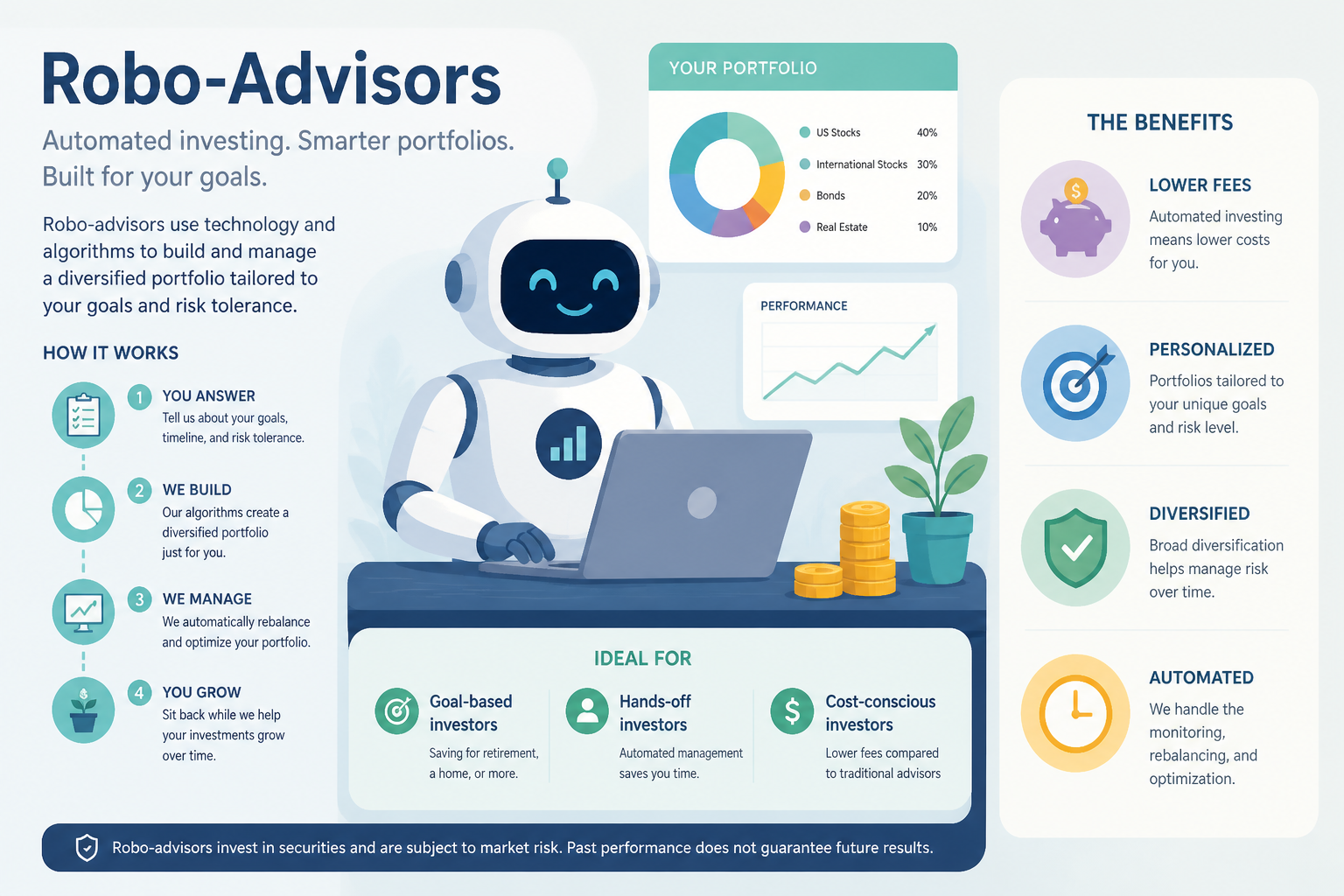
Before you fund the account, review what the robo-advisor will actually invest in. Most platforms use low-cost ETFs.
You’ll see something like:
- U.S. large-cap stocks: 35% (via Vanguard Total Stock Market ETF)
- U.S. small-cap stocks: 10%
- International stocks: 25%
- Emerging markets: 10%
- U.S. bonds: 15%
- Real estate (REITs): 5%
Check:
- Does the allocation match your risk tolerance?
- Are the expense ratios low? (Look for under 0.10% per fund)
- Is the portfolio diversified across asset classes?
If you’re satisfied, approve it. You can adjust later if your goals change.
Step 6: Link your bank account
To transfer money, you’ll connect your checking or savings account.
The platform will ask for your bank’s routing number and account number. Most use Plaid or something similar to verify your bank instantly. You’ll log into your bank through a secure portal and the connection happens automatically.
If instant verification doesn’t work, you can manually enter your routing and account numbers. The platform will make two small deposits (usually under $1 each) within 1-2 business days. You’ll verify the exact amounts to confirm ownership.
It’s safe—robo-advisors use bank level encryption and can only pull funds with your permission. They can’t withdraw money without your approval.
Step 7: Make your first deposit
Decide how much to invest. Remember the minimums:
- Wealthfront: $500
- Betterment: $0-$50
- Fidelity Go: $0
- Schwab Intelligent Portfolios: $5,000
- Vanguard Digital Advisor: $100
Transfer the amount from your linked bank. Most platforms let you choose:
- One-time deposit (transfer a lump sum now)
- Recurring deposits (automatically invest a set amount weekly, biweekly, or monthly)
If the minimum feels like a lot, start with what you can afford. Investing $50/month consistently beats waiting until you have a large lump sum.
Funds typically arrive within 3-5 business days. Your money won’t be invested until the deposit clears.
Step 8: Wait for your portfolio to go live
Once your deposit clears, the robo-advisor automatically purchases the ETFs in your portfolio. This usually happens within one business day.
You’ll get an email confirmation with a summary of what was purchased, the exact number of shares of each ETF, and your starting balance.
Your dashboard will show current value, total return (close to $0 since you just started), and a breakdown by asset class.
Your account value will fluctuate daily. This is normal. Robo-advisors are built for long term investing—short term drops are expected and not a reason to panic.
Step 9: Set up recurring deposits
The most important step: automate your investments.
Go to account settings and set up recurring transfers. Choose:
- Frequency (weekly, biweekly, or monthly)
- Amount (whatever you can consistently afford—even $25/week adds up)
- Start date (the day after your paycheck hits)
Why this matters: Consistent investing over time (dollar cost averaging) reduces the impact of market volatility. When prices are high, your fixed deposit buys fewer shares. When prices drop, it buys more. Over years, this averages out to solid returns.
Example: Investing $200/month for 20 years at a 7% average annual return grows to around $104,000—even though you only contributed $48,000.
Step 10: Turn on tax-loss harvesting (if available)
If your robo-advisor offers tax-loss harvesting and you’re investing in a taxable brokerage account, turn it on. Available on Wealthfront (daily, automatic), Betterment (automatic), and Schwab Intelligent Portfolios (automatic).
What it does: When an investment drops in value, the robo-advisor automatically sells it at a loss and immediately buys a similar (but not identical) investment. This generates a tax loss you can use to offset other gains or deduct up to $3,000 from your income.
Tax-loss harvesting can save you hundreds or thousands in taxes over time. If you’re investing in an IRA, this feature won’t be available (and isn’t needed—IRAs are already tax advantaged).
Step 11: Download the mobile app
Every major robo-advisor has a mobile app:
The app lets you check your balance, adjust recurring deposits, make one-time deposits, and track goals.
Important: Checking your balance too often can trigger emotional reactions to short term swings. Most experts recommend checking quarterly, not daily.
Step 12: Let it run
Robo-advisors handle everything automatically:
- Rebalancing (when your portfolio drifts from its target allocation, the system sells some assets and buys others to restore balance)
- Reinvesting dividends (any dividends are automatically reinvested)
- Tax optimization (ongoing tax-loss harvesting happens in the background if enabled)
Your only job: Keep making recurring deposits and avoid the urge to sell when the market drops.
When to check in:
- Annually (review your goals—has anything changed?)
- After major life events (new job, marriage, buying a home)
- Never during market crashes
You’ll see steady, gradual growth over months and years. Your balance will fluctuate, but over 5-10+ years, diversified portfolios historically trend upward.
—
What you just accomplished
You now have:
- A professionally managed investment portfolio tailored to your risk tolerance
- Automated recurring deposits building wealth without requiring ongoing decisions
- Tax optimization running in the background (if applicable)
- 24/7 access to your investments
Next steps:
- Set specific financial goals in your dashboard (most platforms have goal tracking tools)
- Increase your recurring deposits when you get a raise or pay off debt
- Open additional account types if you want to save for multiple goals
Most robo-advisors also offer access to human financial advisors if you have questions. Betterment and Vanguard provide unlimited coaching for certain account balances.
Start investing with Wealthfront →
—
Troubleshooting
Identity verification failed
The info you entered doesn’t match what’s on file with credit bureaus. Double-check your Social Security number, date of birth, and address for typos. If it still fails, contact support and upload a photo ID.
Bank account won’t link
Try manual verification instead of instant. Some smaller banks and credit unions aren’t supported by Plaid. You’ll verify ownership by confirming two small test deposits.
Risk assessment questions are confusing
If you’re stuck on “How would you react to a 20% loss?”, think about 2020’s market crash. If you would have panicked and sold everything, choose conservative. If you would have kept investing or bought more, choose moderate or aggressive.
Minimum investment is too high
Start with Betterment or Fidelity Go ($0 minimum). As your balance grows, you can transfer to a different platform if you prefer its features.
Portfolio lost money in the first week
Short term losses are completely normal. Markets fluctuate daily. Robo-advisors are built for long term investing (5+ years). Check your balance quarterly, not weekly.
—
FAQ
Do I need a paid plan?
No. All robo-advisors mentioned have standard accounts with the fees listed above. There are no “paid plans”—the annual percentage fee is all you pay.
How long until I see returns?
Investment returns happen over years, not weeks. Historically, diversified portfolios return 6-8% annually on average, but any given year can be higher or lower. Plan to invest for at least 5 years.
Can I do this without a robo-advisor?
Yes, but you’d need to manually research ETFs, calculate your allocation, rebalance periodically, and handle tax-loss harvesting yourself. For most beginners, the 0.25% fee is worth the automation.
Is my money safe?
Yes. Robo-advisors are regulated by the SEC and are members of FINRA and SIPC. Your investments are insured up to $500,000 (including $250,000 in cash) by SIPC if the company fails. Market losses aren’t insured—but that’s true of all investing.
What if I need my money early?
You can withdraw from a taxable brokerage account anytime, though you’ll pay taxes on gains. Early withdrawals from IRAs before age 59½ typically incur a 10% penalty plus taxes (with some exceptions for first home purchases, education, etc.).
How do robo-advisors get paid?
They charge an annual management fee (typically 0.25% to 0.85%) calculated as a percentage of your account balance. If you have $10,000 invested and pay 0.25%, that’s $25/year. The fee is automatically deducted quarterly.
—