Best AI Image Generators: Stop Overpaying and Start Creating Stunning Visuals Today

Choosing the best AI image generator shouldn’t feel like navigating a minefield of subscription traps and hidden costs. If you’re a content creator, marketer, or business owner, you need tools that deliver professional results without draining your budget or wasting hours on trial and error.
The AI image generation landscape has exploded in recent years, with dozens of platforms promising photorealistic results, artistic masterpieces, and unlimited creative freedom. But not all AI image generators are created equal, and the most expensive option isn’t always the best choice for your specific needs.
Why Choosing the Right AI Image Generator Matters
The wrong AI image tool can cost you in three ways: money wasted on unused subscriptions, time lost learning complex interfaces, and opportunities missed because the output quality doesn’t match your standards. With monthly subscriptions ranging from free to $60+, making an informed decision isn’t just smart—it’s necessary for your bottom line.
What Makes an AI Image Generator “Best”?
Before diving into specific platforms, here are the criteria that separate exceptional AI image generators from mediocre ones:
Image Quality and Realism: The best AI image generators produce outputs that are sharp, detailed, and free from obvious artifacts like distorted hands, warped faces, or unnatural lighting. They handle complex prompts accurately and maintain consistency across multiple generations.
Prompt Understanding: Superior platforms interpret natural language effectively, understanding context, style references, and artistic terminology without requiring extensive prompt engineering knowledge.
Speed and Efficiency: Time is money. Top-tier generators deliver results in seconds or minutes, not hours, and allow batch processing for scaled content creation.
Licensing and Commercial Rights: The best AI image generators provide clear, straightforward licensing that allows commercial use without legal ambiguity or hidden restrictions.
Value for Money: Whether free or paid, the best platforms offer transparent pricing with no surprise charges, reasonable usage limits, and features that justify the cost.
Top AI Image Generators Ranked by Use Case
For Professional Marketing and Business Use
Midjourney remains the industry standard for professional-grade AI imagery. Its latest models produce consistently stunning results with exceptional attention to detail, ideal for advertising campaigns, product mockups, and high-stakes marketing materials. The Discord-based interface takes some adjustment, but the quality justifies the learning curve.
The platform operates on a subscription model starting at $10/month for the basic plan, which includes approximately 200 image generations. For businesses requiring volume, the $30/month standard plan offers unlimited generations in “relaxed” mode plus 15 hours of fast generation time.
DALL-E 3 (via ChatGPT Plus) offers convenience for those already using ChatGPT for content creation. The integration allows natural conversation-based image generation, automatic prompt enhancement, and seamless workflow integration. At $20/month for ChatGPT Plus, you get AI image generation bundled with advanced language model capabilities.
The platform excels at understanding complex prompts and generating images that closely match specific requirements. It’s effective for creating custom illustrations, infographics, and conceptual artwork for presentations and reports.
For Budget-Conscious Creators
If you’re looking for quality without breaking the bank, several platforms deliver impressive results at lower price points or even for free. Check out our detailed guide on the best free AI image generators to explore no-cost options that still produce professional results.
Leonardo.AI strikes a good balance between cost and capability. The free tier includes 150 tokens daily (roughly 30 images), which resets every 24 hours. This allocation works well for consistent, daily content creation without spending a dime.
The platform’s interface is intuitive, offering fine-tuned control over styles, aspect ratios, and generation settings. Paid plans start at $10/month for 8,500 monthly tokens, providing substantial value for small businesses and freelancers.
Playground AI offers 500 images per day on the free plan—an almost unheard-of level of generosity in the AI image generation space. The quality ranges from good to excellent depending on the model selected, with strong performance in artistic and illustrative styles.
For Beginners and Learning
Starting with AI image generation can feel overwhelming, but some platforms are designed with newcomers in mind. Our guide on best AI image generators for beginners walks through the learning curve step-by-step.
Canva AI Image Generator integrates seamlessly into Canva’s familiar design interface, making it the most accessible option for non-technical users. If you’re already comfortable with basic design tools, you’ll feel at home immediately. The AI generator is included in Canva Pro subscriptions ($12.99/month) alongside thousands of templates and design assets.
Microsoft Designer (powered by DALL-E) provides a completely free, user-friendly entry point into AI image creation. The web-based interface requires only a Microsoft account, and the integration with Designer’s layout tools helps users create complete designs, not just standalone images.
For Artists and Creative Professionals
Stable Diffusion (via platforms like Stability.AI or local installation) offers unmatched creative control for artists willing to invest time in learning. The open-source nature allows fine-tuning, custom model training, and complete artistic freedom without content restrictions.
Advanced users can run Stable Diffusion locally, eliminating ongoing costs after the initial hardware investment. For those preferring cloud-based access, Stability.AI’s API and DreamStudio interface provide professional-grade tools starting at $10 for 1,000 credits.
Artbreeder takes a different approach by focusing on iterative creation and mixing. Rather than generating images from text alone, users blend existing images and adjust parameters to create hybrid results. This method appeals to character designers, world-builders, and concept artists exploring variations on a theme.
How to Maximize Value from AI Image Generators
Master Prompt Engineering
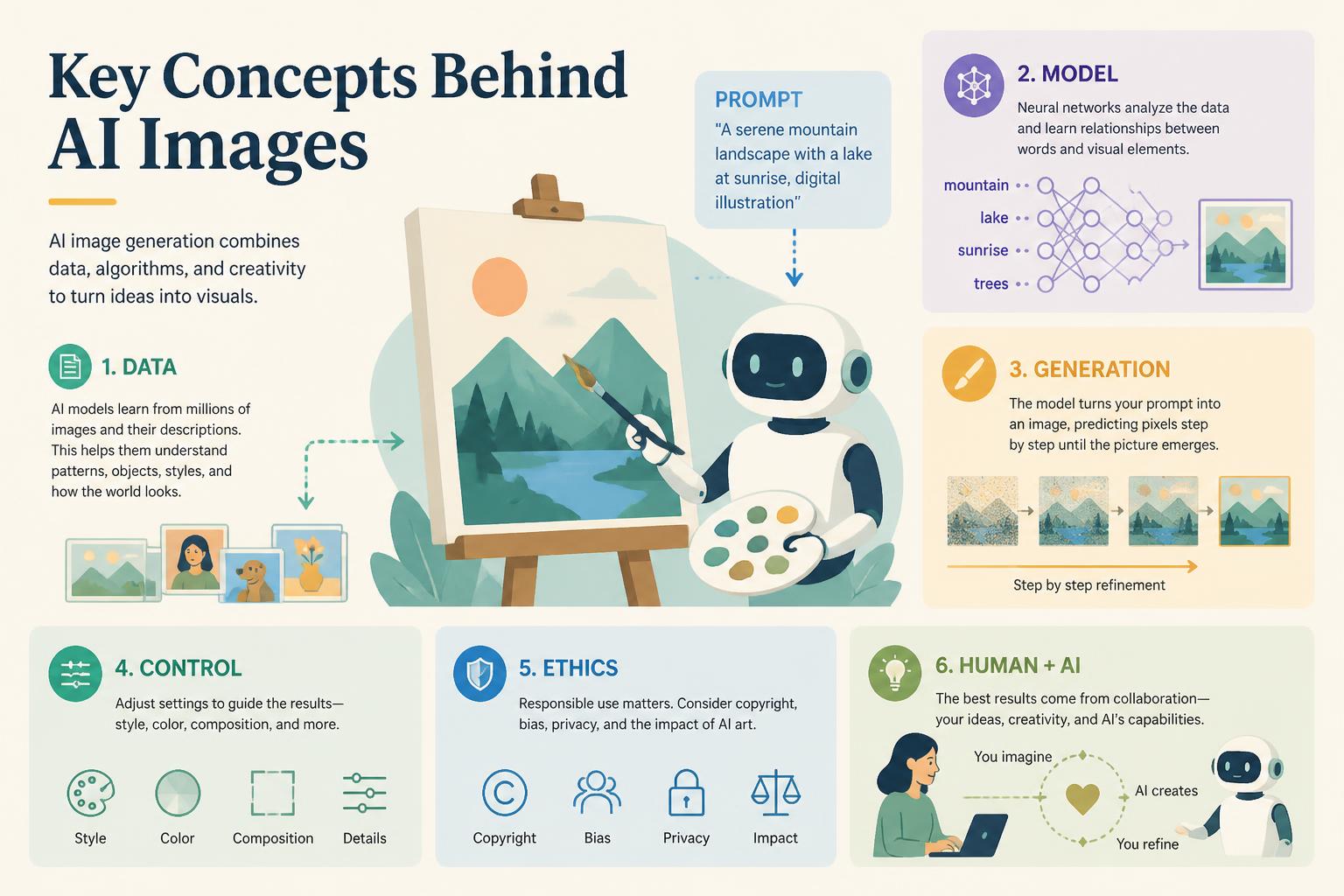
The difference between mediocre and exceptional AI images often comes down to prompt quality. Effective prompts include specific details about:
- Subject and composition: Clearly describe what you want to see and how elements should be arranged
- Style and artistic reference: Mention specific art styles, artists, or visual movements
- Technical specifications: Include details about lighting, camera angle, depth of field, and mood
- Quality modifiers: Terms like “highly detailed,” “professional photography,” or “8K resolution” often improve output quality
Leverage Free Tiers Strategically
Many creators successfully operate without paid subscriptions by rotating between platforms’ free tiers. Leonardo.AI offers 150 daily tokens, Playground AI provides 500 daily images, and Microsoft Designer has no usage limits. Combined strategically, these free options can meet substantial content creation needs.
Understand Licensing and Attribution
Before using AI-generated images commercially, verify the platform’s terms of service. Most major platforms allow commercial use for paid subscribers, but free tiers sometimes have restrictions. Always check:
- Whether commercial use is permitted
- If attribution is required
- Who owns the copyright to generated images
- Any restrictions on content types or industries
Optimize Your Workflow
Efficiency separates professionals from hobbyists. Implement these practices to maximize productivity:
Batch similar requests: Generate multiple variations in one session rather than switching contexts frequently.
Save successful prompts: Build a personal library of effective prompts for common needs, adjusting variables rather than starting from scratch each time.
Use iteration features: Most platforms allow you to refine and modify existing generations. This approach is faster and more cost-effective than generating entirely new images repeatedly.
Looking Ahead: The Future of AI Image Generation
The AI image generation field evolves rapidly, with new capabilities emerging monthly. Staying current with the latest developments helps you maintain competitive advantage and cost efficiency.
For the most up-to-date recommendations and emerging platforms, explore our best AI image generators for 2025, which covers the latest models, features, and pricing changes.
Emerging Trends to Watch
Real-time generation: New models are approaching near-instantaneous image creation, enabling interactive design workflows previously impossible.
Improved consistency: Character and scene consistency across multiple generations—historically a weakness—has improved dramatically with new training techniques.
3D and video expansion: Leading platforms are expanding beyond still images into 3D model generation and video creation, opening new creative possibilities.
Integration with traditional tools: Adobe, Canva, and other established design platforms are incorporating AI generation directly into existing workflows, reducing friction between ideation and execution.
Making Your Decision: A Framework
With dozens of viable options, choosing the best AI image generator requires matching capabilities to your specific situation. Consider these factors:
Budget reality: Be honest about what you can sustainably spend monthly. Free tiers work well for sporadic needs, while high-volume users should calculate cost-per-image across paid plans.
Volume requirements: Estimate monthly image needs realistically. Overestimating leads to wasted subscriptions; underestimating causes frustration when you hit limits during critical projects.
Quality standards: Different platforms excel at different styles. Test multiple options with identical prompts to compare output quality for your specific use case.
Technical comfort: Some platforms require prompt engineering mastery; others offer intuitive interfaces with guided creation. Match the tool to your skill level and willingness to learn.
Integration needs: If you use specific design, CMS, or workflow tools, platforms with direct integrations save time and friction.
Common Pitfalls to Avoid
Subscription overlap: Many creators maintain multiple subscriptions “just in case,” wasting hundreds annually. Audit your actual usage and cancel underutilized services.
Ignoring free options: The assumption that “paid equals better” doesn’t always hold in AI image generation. Free tiers from Leonardo.AI, Playground AI, and Microsoft Designer rival or exceed some paid alternatives in specific use cases.
Prompt complexity addiction: Beginners often create overly elaborate prompts, assuming more words mean better results. Concise, clear descriptions frequently outperform verbose paragraph-length prompts.
Neglecting output rights: Using AI images commercially without verifying licensing terms creates legal risk. Always confirm rights before publication, especially for client work or products.
Chasing every new platform: New AI image generators launch constantly, each promising revolutionary capabilities. Evaluate objectively rather than jumping to every shiny new option.
Practical Steps to Get Started Today
Ready to find your best AI image generator? Follow this action plan:
- Define your needs: List specific use cases, monthly volume estimates, and must-have features before evaluating platforms.
- Test free options first: Sign up for free tiers on Leonardo.AI, Playground AI, and Microsoft Designer. Spend a week generating images for real projects.
- Compare quality objectively: Use identical prompts across platforms and evaluate results side-by-side. Save examples for reference.
- Calculate true cost: Factor in learning time, generation speed, and output quality when comparing price points. The cheapest option isn’t always the best value.
- Start with one paid subscription: Once you’ve identified the platform that best matches your needs, commit to a single paid plan rather than hedging with multiple services.
- Review quarterly: Set calendar reminders to audit your usage and expenses every three months. Cancel underused services and adjust plans based on actual consumption.
The Bottom Line
The best AI image generator is the one that consistently delivers the quality you need at a price point that makes financial sense for your situation. For most users, this means starting with free tiers, testing multiple platforms with real-world projects, and upgrading strategically based on proven need rather than theoretical capability.
Professional marketers and businesses with high-volume needs will find value in Midjourney’s quality or DALL-E 3’s integration with existing workflows. Budget-conscious creators can achieve good results using free platforms like Leonardo.AI and Playground AI. Beginners benefit from accessible interfaces like Canva AI or Microsoft Designer.
The AI image generation landscape will continue evolving rapidly, with quality improving and costs potentially decreasing as competition intensifies. By focusing on practical value rather than hype, testing before committing, and regularly reassessing your needs, you’ll avoid overpaying while accessing the cutting-edge capabilities that drive creative and business success.
Stop wasting time and money on the wrong tools. Start with free options, test thoroughly, and invest in paid subscriptions only when proven value justifies the cost. Your next stunning visual is just a well-crafted prompt away.