
Best Free AI Image Generators: A Guide to Creating Visuals Without Paying

Choosing the right AI image generator is overwhelming. You’re stuck between expensive premium tools and free options that might waste your time. You’re not even sure which features matter.
You don’t need to pay hundreds of dollars monthly for decent AI images. Free AI image generators have gotten a lot better. But picking the wrong one means watermarks, usage restrictions, or bad outputs.
This guide cuts through the noise. We tested dozens of platforms to show you which free AI image generators work, how to use them well, and when upgrading makes sense.
Understanding AI Image Generation Technology
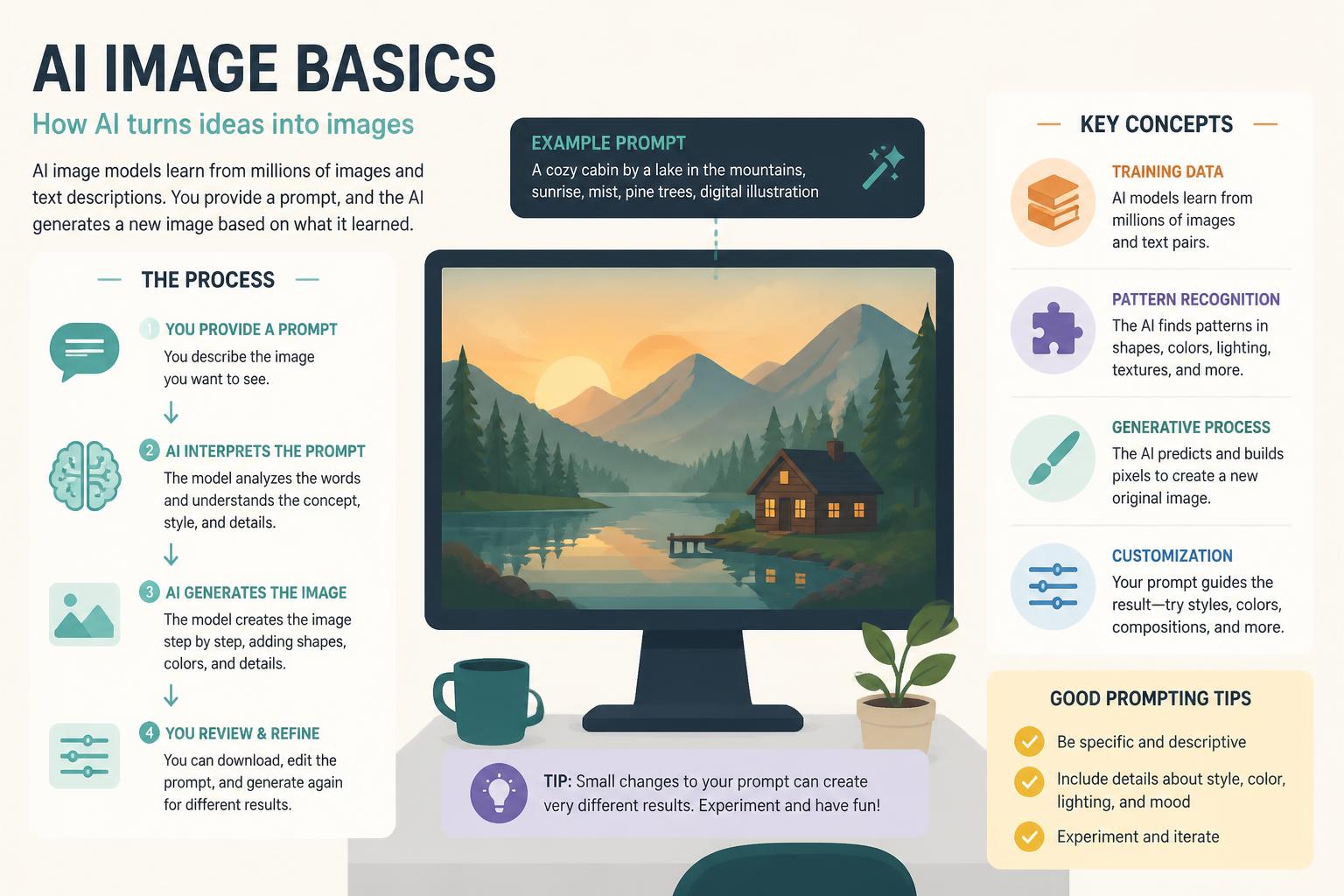
AI image generators use deep learning models trained on millions of images to create new visuals from text descriptions. When you type “sunset over mountains with pine trees,” the AI analyzes patterns from training and generates an image.
These tools typically use diffusion models or GANs (Generative Adversarial Networks). Diffusion models start with random noise and gradually refine it. GANs pit two neural networks against each other—one generating images, the other judging quality.
What matters isn’t the technical architecture but three factors that separate good tools from mediocre ones:
Model quality determines output realism and artistic capability. DALL-E 3, Midjourney, and Stable Diffusion are current state-of-the-art. Older models produce noticeably worse results.
Prompt interpretation affects how accurately the tool understands your description. Better systems grasp complex instructions and understand artistic styles.
Output control includes aspect ratio selection, style presets, negative prompts (telling the AI what to avoid), and iteration options.
Top Free AI Image Generators Compared
DALL-E 2 by OpenAI
OpenAI’s DALL-E 2 offers 15 free credits monthly. Each credit generates four image variations. The interface is beginner-friendly.
Strengths: Exceptional prompt understanding, photorealistic outputs, reliable consistency. DALL-E 2 handles complex scenes with multiple subjects better than most competitors.
Limitations: Free credits reset monthly rather than accumulating. No advanced editing beyond basic variations. Check OpenAI’s terms for commercial use.
Best for: Quick professional mockups, marketing visuals, concepts requiring photorealism.
Microsoft Bing Image Creator
Powered by DALL-E 3, Bing Image Creator delivers good results without subscription fees. You get “boosts” for faster generation, but even without them, it’s free.
Strengths: Access to DALL-E 3 at no cost, unlimited generations (slower without boosts), integrated into Microsoft’s ecosystem.
Limitations: Slower after using daily boosts. Fixed image sizes. Less control over parameters compared to advanced tools.
Best for: High-volume needs, testing multiple concepts, users already in Microsoft products.
Leonardo AI
Leonardo AI provides 150 daily tokens on its free plan—about 30-40 images depending on resolution and model. The platform focuses on game assets, concept art, and character design.
Strengths: Multiple AI models for different art styles, advanced control features, community-shared prompts.
Limitations: Token system can be confusing at first. The interface feels overwhelming for beginners.
Best for: Game developers, illustrators, creators needing consistent character designs or fantasy art.
Playground AI
Playground AI grants 500 daily images on its free tier—the most generous among major platforms. The tool emphasizes ease of use.
Strengths: Extremely generous free tier, mixed image editing (combining your uploads with AI generation), filters for instant style application.
Limitations: Some advanced features reserved for paid tiers. Community images dominate the homepage, which can distract.
Best for: Social media creators, bloggers, anyone needing high daily volume without payment.
Craiyon (formerly DALL-E mini)
Craiyon is completely free with no limits, supported by ads. It won’t match premium tools in quality but removes all usage barriers.
Strengths: Truly unlimited, no account required, works on any device, fastest way to test ideas.
Limitations: Lower resolution, occasional quirky results, visible watermark on free version, slower generation.
Best for: Brainstorming, casual projects, educational purposes, users who won’t monetize images.
Stable Diffusion (via DreamStudio)
Stability AI offers DreamStudio as the official interface for Stable Diffusion, providing 25 free credits at signup. Each credit generates one 512×512 image.
Strengths: Open-source foundation means extensive customization, negative prompts for precise control, ability to run locally for unlimited free use (requires technical setup).
Limitations: Steeper learning curve, free credits don’t refresh monthly, requires understanding prompt engineering.
Best for: Technical users, developers, creators wanting maximum control.
Choosing the Right Tool for Your Needs
Your ideal AI image generator depends on specific use cases.
For social media marketing: Playground AI’s high daily limit and quick iterations make it good for testing multiple post concepts. Mixed image editing lets you incorporate brand elements into AI-generated backgrounds.
For professional client work: DALL-E 2’s reliability and photorealistic quality justify building workflows around its monthly credits. Results require less post-processing.
For creative exploration: Leonardo AI’s diverse models and community resources accelerate learning. The token system encourages intentional prompting rather than random generation.
For blog and content illustrations: Bing Image Creator’s unlimited nature and DALL-E 3 technology provide publication-ready images without worrying about credit depletion.
For learning and experimentation: Craiyon removes all pressure and costs, making it good for understanding how prompt wording affects outputs.
Maximizing Free Tier Benefits
Every free AI image generator has strategies to extend its value.
Optimize your prompts. Instead of “a dog in a park,” try “golden retriever playing fetch in a sunlit park, shallow depth of field, professional photography.” Specific prompts reduce wasted generations.
Use multiple platforms together. Generate concepts on unlimited tools like Craiyon or Bing Image Creator, then refine winning directions on quality-focused platforms like DALL-E 2.
Schedule generation around refresh cycles. DALL-E 2 credits reset monthly, Leonardo AI tokens refresh daily. Plan bulk sessions after resets.
Leverage community resources. Most platforms feature community galleries with visible prompts. Finding similar successful images and adapting their prompts saves experimentation credits.
Batch similar requests. When using limited-credit tools, generate all variations of a concept in one session. The AI maintains context better when requests are grouped.
Master negative prompts. Tools supporting negative prompts dramatically improve accuracy. “Beautiful landscape, negative prompt: people, cars, buildings” clarifies your vision without extra generations.
Common Pitfalls to Avoid
Expecting perfect first outputs. Even the best AI image generators typically need 3-5 iterations. Free tools make this iterative approach challenging, so invest time in prompt refinement.
Ignoring commercial licensing. Free doesn’t automatically mean commercially usable. OpenAI, Stability AI, and Microsoft have specific terms for business use. Review licensing before using images in client projects.
Overlooking image resolution requirements. Many free tiers default to lower resolutions (512×512 or 1024×1024). Verify whether your final use case works with these dimensions.
Neglecting style consistency. Creating a cohesive set of images across multiple sessions requires documenting exact prompts, settings, and seed numbers. Free tools rarely include project management features.
Assuming all AI art is copyright-free. While you typically own AI-generated images, using them commercially might require attribution or have restrictions based on platform terms.
When to Consider Upgrading
Free AI image generators work for many use cases, but specific scenarios justify paid subscriptions.
High-volume commercial needs. If you’re generating dozens of images weekly for client projects, paid tiers offering unlimited generations eliminate usage anxiety.
Resolution requirements. Print projects, billboards, or detailed web graphics often need 2048×2048 or larger. Free tiers rarely offer these sizes.
Advanced editing capabilities. Inpainting (modifying specific image areas), outpainting (extending boundaries), and upscaling become essential for professional refinement. These features usually require paid access.
Priority generation speed. Free tiers often queue your requests behind paid users. For deadline-driven work, faster processing justifies subscription costs.
Consistent style needs. Paid tools typically offer style libraries, custom model training, and better consistency features for branding or serialized content.
Practical Workflow Tips
Building efficient workflows around free AI image generators maximizes output quality while respecting credit limitations.
Start with thumbnail sketches. Quick pencil sketches help craft better prompts and reduce trial-and-error. Even rough drawings clarify composition and subject placement.
Create a prompt library. Document successful prompts in a spreadsheet with the resulting images. Over time, you’ll identify patterns in phrasing that consistently produce desired results.
Use reference images strategically. Tools like Leonardo AI and Playground AI support image uploads as generation guides. This dramatically improves accuracy for specific poses or compositions.
Time your sessions. Generate images during off-peak hours when free-tier queue times are shorter. Early mornings and late evenings typically see faster processing.
Combine tools in sequence. Generate base concepts on unlimited platforms, upscale winning images with dedicated upscaling tools (many are free), then refine details in photo editors like Photopea or GIMP.
The Future of Free AI Image Generation
The competitive landscape means free tiers will remain viable. As companies compete for users and training data, generous free offerings serve as marketing and data collection strategies.
Expect these developments:
Model improvements will continue closing quality gaps between free and paid tiers. Stable Diffusion’s open-source nature drives rapid advancement.
Interface simplification as platforms recognize that complex controls intimidate casual users. Future tools will hide technical parameters behind simple sliders and presets.
Better mobile experiences since most AI image generation currently favors desktop. Optimized mobile apps will expand accessibility.
Enhanced editing integration combining generation and refinement in single workflows.
Community features including prompt sharing, collaborative projects, and teaching resources that make effective prompting easier to learn.
Getting Started Today
Stop overthinking and start generating. Your first images won’t be perfect, but every generation teaches you something.
Begin with Bing Image Creator or Playground AI—their generous free tiers let you experiment without pressure. Generate 10-15 variations of a single concept, adjusting one element per iteration to understand cause and effect.
Document what works. Save successful prompts, note which platforms excel at specific styles, track your learning. This foundation makes every subsequent project faster.
Free AI image generators aren’t compromises—they’re powerful creative tools that democratize professional-quality visual content. The right platform plus thoughtful prompting produces results indistinguishable from paid alternatives.
For more detailed comparisons and platform reviews, check out our complete best ai image guide. Your perfect image is one prompt away.
—










