
What Is AI Coding? The 2026 Reality Behind the Hype
AI coding isn’t about robots writing your entire codebase while you sip coffee. It’s a new layer in how software gets built: you describe intent, the machine handles boilerplate, suggests patterns, catches errors before you hit compile.
85% of developers now regularly use AI coding tools. That’s not early adopters anymore. That’s baseline. But most developers experience inconsistency because they default to free tiers that aren’t built for code.
This guide covers what AI coding actually is, which tools deliver in 2026, and how to use them without overpaying or getting stuck in prompt hell.
Table of Contents
- What AI coding actually means in 2026
- How AI coding tools work (the technical reality)
- Types of AI coding tools you’ll encounter
- The real use cases (not the marketing claims)
- Choosing your first AI coding tool
- Common mistakes developers make with AI tools
- How much AI coding actually costs in 2026
- Will AI replace programmers?
- FAQ

What AI coding actually means in 2026
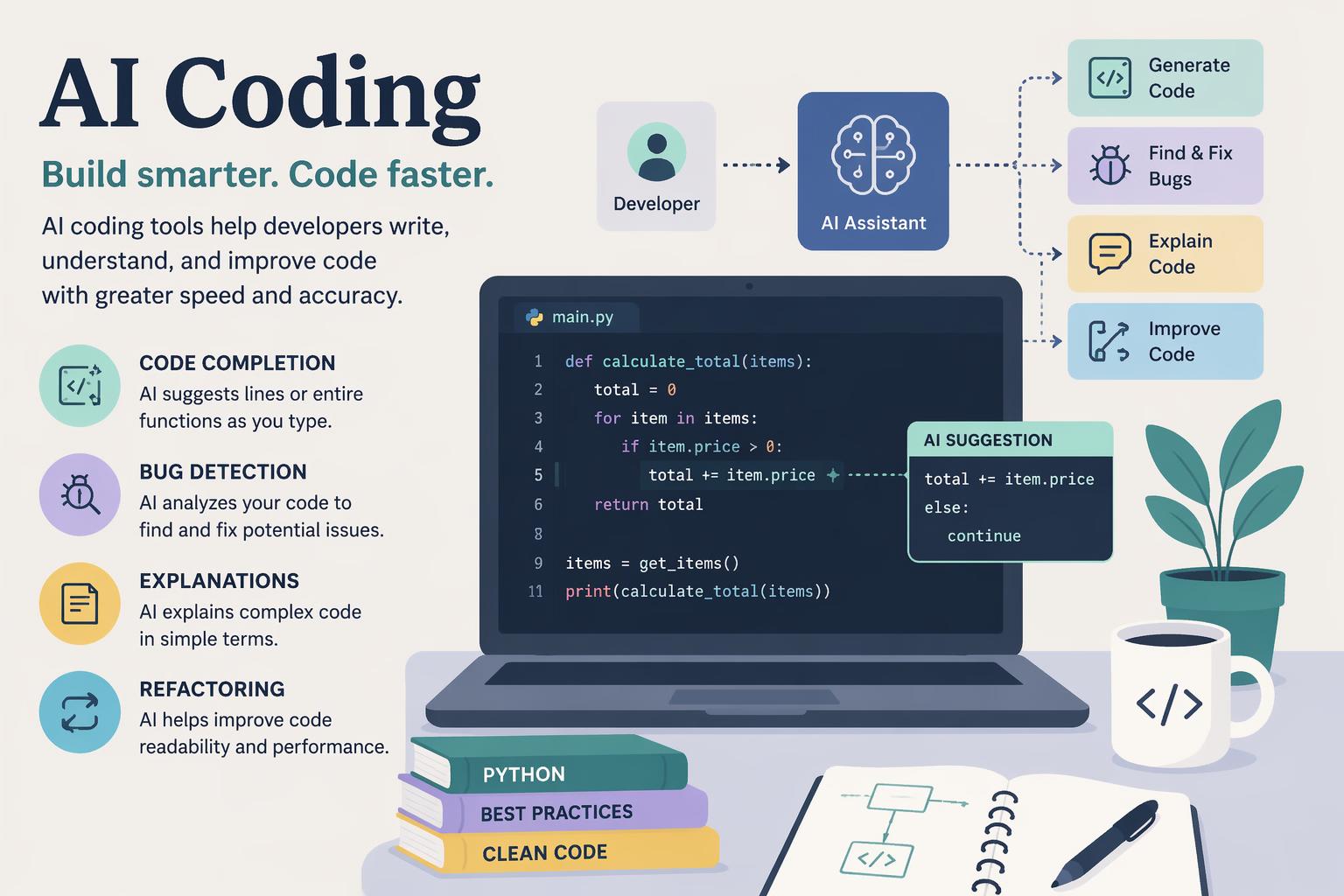
AI coding is using large language models and specialized code intelligence systems to assist with software development tasks. Instead of writing every line from scratch, you work with a tool that suggests completions, generates boilerplate, refactors code, explains complex logic.
Think of it as pair programming with a partner who’s read every public GitHub repository but has zero ego and infinite patience.
What changed in 2026: AI tools moved from novelty autocomplete to agentic systems that can plan tasks, write code, run tests. Tools like Claude Code now handle task planning and code writing with testing assistance. Devin offers autonomous AI engineering with end to end task management.
According to research from early 2026, 84% of developers are using or planning to use AI tools. The gap isn’t between developers who use AI and those who don’t. It’s between those who wield it effectively and those who treat it like a magic wand.
How AI coding tools work (the technical reality)
AI coding tools are built on transformer-based language models trained on massive code repositories. They predict the next token (word, symbol, or line) based on context: your current file, surrounding code, comments, sometimes your entire codebase.
The three core mechanisms:
Inline completion. As you type, the model suggests the next few lines. GitHub Copilot pioneered this with real time code suggestions and inline completions. It integrates directly with VS Code, JetBrains, Vim.
Chat based generation. You describe what you want in natural language, the model writes a function, class, or entire module. Claude ($20/month) handles complex reasoning and clear explanations, and it deals with large codebases better than most alternatives.
Agentic workflows. Newer tools plan multi step tasks, execute them, iterate. Claude Code offers agentic development capabilities where it plans tasks and assists with testing. Devin takes this further with autonomous engineering that manages tasks end to end.
What the models can’t do: they don’t understand your business logic. They don’t know which architectural decisions were deliberate vs technical debt. They hallucinate APIs that don’t exist. And they produce code that compiles but doesn’t solve the actual problem if your prompt was vague.
One developer put it bluntly in a January 2026 guide: “AI won’t replace developers; it will create a gap between those who wield it effectively and those who don’t.”
Types of AI coding tools you’ll encounter
The 2026 landscape splits into five categories. Each solves a different part of the development workflow.
Inline code assistants
These live inside your editor and suggest as you type.
GitHub Copilot is $10/month, free for students and open source maintainers. Works in VS Code, integrates with your existing setup. The safe choice for most developers.
Cursor is an AI powered code editor with context aware suggestions and VS Code integration. Built for developers who want IDE level assistance without switching tools.
Chat based coding assistants
You describe a problem; they write the solution.
Claude is $20/month. Good for complex reasoning and large codebases. If you’re debugging a gnarly inheritance chain or refactoring a legacy module, Claude handles nuance better than GPT-4.
ChatGPT / GPT-4 is the most versatile general purpose assistant. Good at explaining unfamiliar frameworks and generating project boilerplate.
Full stack AI IDEs
These combine editing, hosting, deployment.
Replit is cloud based development with real time collaboration and built in hosting. Basic apps cost $40 to $50 to build. Good for prototyping when you don’t want to set up a local environment.
Playcode AI is $9.99/month for Pro. 15+ AI models that create entire websites from descriptions. Good for web development without manual coding.
No code AI builders
You describe the interface; the tool generates production ready code.
Lovable.dev is user centered product design with quick front end prototyping and Supabase integration. For designers who need to validate ideas fast.
V0 (by Vercel) converts Figma designs to React components. Fast UI development with low code support.
Bolt.new is a rapid prototyping tool that runs in the browser. Lightweight development workflows for quick experiments.
Autonomous agents
These plan, code, test, iterate without constant supervision.
Devin is autonomous AI engineering with end to end task management and iterative improvements. Still early, but signals where the category is heading.
Claude Code has agentic development capabilities focused on task planning, code writing, testing assistance.
The real use cases (not the marketing claims)
AI coding tools shine in specific scenarios. What actually works in 2026, based on developer feedback and real world use:
Boilerplate generation. CRUD endpoints, config files, test scaffolds. If you’ve written it 50 times before, the AI can write it in 10 seconds.
Language translation. Convert Python to TypeScript, refactor class components to hooks, port shell scripts to Node.js. The model knows syntax for dozens of languages.
Documentation and explanation. Paste a dense function and ask “what does this do?” Claude is good here. It breaks down logic step by step.
Test writing. Given a function, generate unit tests with edge cases. Not perfect, but it covers the obvious cases you’d forget.
Debugging assistance. Paste an error log, get likely causes and fixes. Faster than Stack Overflow for common issues.
AI coding still struggles with:
Architectural decisions. Should this be a microservice or a monolith? Should you use Redux or Context API? The model doesn’t have enough context to decide.
Domain specific logic. If your business rules are complex (healthcare workflows, financial calculations, compliance requirements), the AI will guess wrong.
Performance optimization. It can suggest caching or indexing, but it won’t profile your app to find the real bottleneck.
Security. It sometimes generates code with SQL injection risks or hardcoded credentials. Always review security sensitive code.
One 2026 guide emphasized: “Different AI models have varying strengths and costs.” GitHub Copilot is good for inline suggestions. Claude handles reasoning. Playcode AI builds full web apps. Choose based on the task, not hype.
Choosing your first AI coding tool
If you’re new to AI coding, start here.
For most developers: GitHub Copilot ($10/month). It integrates with your existing editor, doesn’t require a workflow change, and the suggestions are conservative enough that they won’t break your build. Free for students and open source maintainers.
For complex reasoning or refactoring: Claude ($20/month). If you’re working with a large codebase or need help understanding unfamiliar code, Claude’s explanations are clearer and more detailed.
For web development without coding: Playcode AI Pro ($9.99/month). If you want to describe a landing page and get a working site, this is the fastest path. 15+ AI models, creates entire websites from descriptions.
For teams and shared codebases: consider tools that respect version control and don’t leak context. A January 2026 article noted that developers need tools that respect shared codebases. Cursor and GitHub Copilot fit here. They work inside your existing Git workflow.
For rapid prototyping: Replit or Bolt.new. Both run in the browser, so you can experiment without setting up a local environment. Replit costs $40 to $50 for basic apps; Bolt.new is lighter but less featured.
Key features to prioritize:
Integration with your existing tools. If it requires switching editors or workflows, you won’t use it.
Context window size. Can it see your entire file? Your project? Larger context means better suggestions.
Model selection. Some tools let you choose between GPT-4, Claude, or open source models. Flexibility matters.
Cost predictability. Per seat pricing vs usage based. For individuals, flat monthly fees are simpler.
Common mistakes developers make with AI tools
Most frustration with AI coding comes from mismatched expectations. What trips people up:
Treating the AI like a search engine. You can’t just type “fix my bug” and expect magic. The more context you provide (error logs, relevant code, what you’ve already tried), the better the output. Effective prompting matters.
A 2026 developer guide stated: “How can developers effectively prompt AI tools?” is one of the top questions. The answer: be specific. Instead of “write a login function,” say “write a Node.js Express login function using bcrypt for password hashing and JWT for session management.”
Defaulting to free tiers. Many developers experience inconsistency because they use free tiers of AI models that aren’t optimized for code. The free version of ChatGPT uses GPT-3.5, which hallucinates more and understands less. If you’re serious about AI coding, budget $10 to $20/month.
One expert noted in 2026: “Setting a realistic monthly budget for using AI tools can save you time and provide better solutions.”
Not reviewing generated code. AI generated code compiles. That doesn’t mean it’s correct, secure, or maintainable. Always review for hardcoded values (API keys, passwords), SQL injection or XSS vulnerabilities, edge cases the AI didn’t consider, logic that doesn’t match your business rules.
Using the wrong tool for the task. GitHub Copilot is good for inline suggestions. It’s terrible at explaining complex algorithms. Claude is good at reasoning. It’s overkill for autocompleting a for loop. Match the tool to the job.
Expecting the AI to replace learning. If you don’t understand the code the AI generates, you can’t debug it, extend it, or review it for correctness. AI coding tools are force multipliers. They amplify your existing skills. They don’t replace foundational knowledge.
How much AI coding actually costs in 2026
AI coding tools use subscription pricing, usage based billing, or hybrid models. The real cost breakdown for 2026:
Individual developer budget:
GitHub Copilot: $10/month (free for students and open source maintainers)
Claude: $20/month
Playcode AI Pro: $9.99/month
Total for a typical setup: $20 to $30/month if you use Copilot + Claude, or $10/month if Copilot alone is enough.
Team pricing scales per seat. If you have five developers, expect $50 to $150/month depending on which tools you standardize on.
Hidden costs to watch for:
API usage charges. Some tools bill per token or request. If you’re generating thousands of lines of code daily, check usage caps.
Model upgrades. Premium models (GPT-4 Turbo, Claude Opus) cost more per request. Free tiers use older, less capable models.
Compute for hosting. Tools like Replit charge for hosting and compute. Basic apps cost $40 to $50 to run.
Is it worth it?
If an AI tool saves you 2 hours a week, that’s 100 hours a year. At a $50/hour developer rate, that’s $5,000 in value for a $120 to $240 annual cost. The ROI is clear if you actually use the tool.
But if you sign up and never integrate it into your workflow, you’re just paying for guilt. Start with one tool, commit to using it for a month, then evaluate.
Will AI replace programmers?
Short answer: no.
Longer answer: AI won’t replace developers, but it will create a gap between those who use it effectively and those who don’t. That’s not speculation. It’s a direct quote from a January 2026 developer guide.
What AI can’t do:
Understand your business context and make architectural decisions.
Navigate organizational politics to get a feature prioritized.
Debug a production outage at 3 AM when logs are contradictory.
Mentor junior developers or review code with an eye toward maintainability.
Decide which technical debt to pay down and which to defer.
What AI changes:
Junior developers can ship features faster because AI handles boilerplate.
Senior developers spend less time on repetitive tasks and more time on design.
Code reviews focus on logic and architecture, not syntax errors.
The bar for “good enough to ship” rises because AI eliminates common mistakes.
One analysis from April 2026 noted that AI tools have changed how software gets built and that AI integration matters for efficient workflows. The developers who adapt will be more productive. The ones who resist will fall behind.
But “replacing programmers” isn’t the goal or the outcome. AI is a tool, not a coworker.
FAQ
What is the best AI coding assistant in 2026?
For most developers, GitHub Copilot. It’s $10/month, integrates with VS Code and JetBrains, offers real time inline suggestions. If you need complex reasoning or large codebase support, Claude ($20/month) is better. For web development without manual coding, Playcode AI ($9.99/month) creates entire websites from descriptions.
Is GitHub Copilot worth it?
Yes, if you code daily. At $10/month (free for students and open source maintainers), it pays for itself if it saves you 15 minutes a week. The inline suggestions are conservative and don’t require workflow changes. It’s the lowest friction entry point to AI coding.
Can AI replace programmers?
No. AI tools handle boilerplate, suggest patterns, generate tests, but they don’t make architectural decisions, understand business context, or navigate production outages. As one 2026 guide stated: “AI won’t replace developers; it will create a gap between those who wield it effectively and those who don’t.”
Which AI coding assistant is free?
GitHub Copilot is free for students and open source maintainers. Most other tools offer limited free tiers (ChatGPT free uses GPT-3.5, Claude free has usage caps). Bolt.new offers browser based rapid prototyping without a paid tier for basic use.
What are the best AI coding tools for individual developers?
GitHub Copilot for inline suggestions, Claude for reasoning and large codebases, Playcode AI for web development without manual coding. If you’re prototyping, Replit or Bolt.new work well for quick experiments. Budget $10 to $30/month depending on which tools you need.
How can developers effectively prompt AI tools?
Be specific. Instead of “fix my bug,” provide the error log, relevant code, what you’ve tried. Instead of “write a login function,” specify the language, framework, security requirements (e.g., “Node.js Express login using bcrypt and JWT”). More context means better output.
Why is it essential to set a monthly budget for AI usage?
According to 2026 research, setting a realistic monthly budget for AI tools saves time and gives you better solutions. Many developers default to free tiers of AI models that aren’t optimized for code, leading to inconsistency. A $10 to $20/month budget gets you access to models that actually work for coding tasks.
—
AI coding in 2026 isn’t about replacing developers. It’s about eliminating the repetitive tasks so you can focus on problems that actually require human judgment. Start with GitHub Copilot, learn to prompt effectively, don’t expect magic. The gap between developers who use AI well and those who don’t is already visible. Don’t be on the wrong side of it.










